Plugins
Plugins are custom code you can write for the Navigator. They are written for a particular context, for example written for the cursor-bar where you can write your own "click" handling.
Plugins are written in Javascript with an optional HTML file as well.
You can add, edit, and enable plugins through the Navigator project view dashboard.
File layout
A Plugin is a zipped folder that includes an index.js and index.html file.
The HTML file (if present) will automatically be added to the context's HTML container. It will also be automatically removed when disposed.
Here is an example of a Plugin's index.js file.
Here is an example of a Plugin's index.html file. Please note the usage of an HTML ID for the styles and root element. It is highly recommended to work with a very unique ID to avoid conflicts with other Plugins and the Navigator itself.
Plugin Locations
A Plugin's location decides where it can be loaded, what container it gets, and which params it is handed.
| Location | Description | |
|---|---|---|
Cursor barNAVIGATOR_CURSOR_BAR | The cursor bar is the toolbar found in the top-left corner of the Navigator. It is responsible for actions the user performs when clicking on the scene or Entities in the scene. The Plugin loads when the user enables the tool and is disposed when they disable it, so a cursor Plugin needs no state of its own to know whether it is active. | 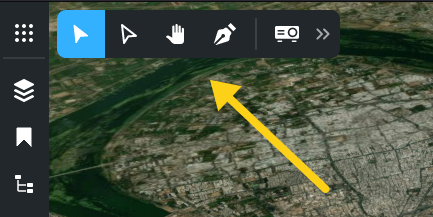 |
Info ViewNAVIGATOR_INFO_VIEW | The Info View panel is the dialog that appears when an Entity is selected. This location replaces that panel's contents, so the Plugin is responsible for presenting the Entity itself. | 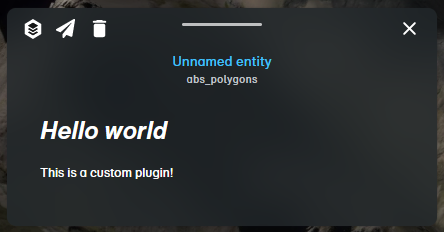 |
Selected Entity panel tabNAVIGATOR_INFO_VIEW_ENTITY | Adds a tab alongside Navigator's own tabs in the selected Entity panel, rather than replacing it. This is usually what you want: the user keeps the built-in views and gains yours. | |
Selected Multi-Entity panel tabNAVIGATOR_INFO_VIEW_MULTI_ENTITY | The same, for when several Entities are selected at once. Read the selection from the visual register rather than expecting a single Entity. | |
SidebarNAVIGATOR_SIDE_BAR | The side bar is the toolbar found in the left side of Navigator which holds Menu Items, Bookmarks, and Scene Tree. Set the Plugin setting "panelWidth" to control the panel's width. See Side panel width below. | |
BackgroundNAVIGATOR_BACKGROUND | Plugins that are set to load in the background will load automatically when the page loads without the user needing to click any buttons. A background Plugin is reloaded when the Project View or the active Bookmark changes, and is the only location handed the view and bookmark params. | |
AI ToolAI_TOOL | Not a piece of UI. The Plugin is offered to the AI agent as a callable tool and exports Invoke rather than Run. See the AI Tools page. | |
OperatorOPERATOR | Loads inside the Operator management portal rather than Navigator. The params described below are Navigator's, so do not assume a viewer here. |
Setting a location is not enough on its own. A Plugin must also be enabled on the Project View that is being viewed, which is what Navigator checks before loading anything. A Plugin that appears to do nothing is almost always a Plugin that was never enabled on the view.
Plugin Params
Below are what parameters are passed into the Plugin's Run function in Navigator.
Params by location
Not every location is handed every param. The params above are present everywhere in Navigator; the ones below depend on where the Plugin runs, so check for a param rather than assuming it. Params marked unstable are the ones Navigator happens to expose today and may change.
| Param | Where | What it is |
|---|---|---|
setPanelWidth | Side bar | Changes the panel width at runtime, taking the same value as the panelWidth setting. Affects the current session only. |
setFocusedAttachment | Info View locations | Opens Navigator's own attachment viewer on an attachment, with its siblings, so a Plugin does not need to build media browsing itself. Called as setFocusedAttachment(attachment, siblings). |
view, viewId | Background | The active Project View record and its ID. A background Plugin is reloaded when this changes. |
bookmark, bookmarkId, enableBookmark | Background | The active Bookmark, its ID, and a call to activate one. A background Plugin is also reloaded when the Bookmark changes. |
getCursorunstable | Background | Returns the cursor tool the user currently has active, so a background Plugin can react to it. |
The Plugin record
Every Plugin is handed its own record as params.plugin. It is worth knowing what is on it, because several fields exist specifically so a Plugin does not have to be edited per account or per deployment.
| Field | What it does |
|---|---|
Settings | Arbitrary JSON, passed to the Plugin when it loads. This is where an Entity Type ID, an endpoint, a threshold or a colour belongs, so one Plugin serves every account with no code change. Also carries the reserved panelWidth, and tool for AI Tools. |
Enabled | Turns a Plugin off without unpicking it from every Project View that references it. |
Group | An arbitrary grouping you can query against, so a whole related set can be retrieved and enabled at once. This is how an embedded Navigator can be told to enable a group of Plugins by URL param, and have that set change without the URL changing. |
Version | Bumped every time a new code bundle is uploaded, and used as the cache key for the Plugin's code. See Caching while you develop below. |
Icon, IconSource | The button icon, either a Font Awesome class (FONT_AWESOME) or a Client File ID (CLIENT_FILE) for your own image. For background Plugins the icon is only for identification in admin panels. |
IsLoginRequired | Requires a logged-in user. |
IsAccessRestricted | Restricts the Plugin to users holding the UIPlugin_<pluginId> permission. Only checked alongside IsLoginRequired. |
Side panel width
A side bar Plugin's panel is 300px wide by default. The panelWidth setting takes either a fixed CSS width or a range, and a range is what makes the panel user-resizable.
A single value is a fixed width. Two values are a minimum and a maximum, which the user can drag between. Three values add the width to open at. A Plugin can also change this while it runs through the setPanelWidth param, which affects the current session only and does not rewrite the setting.
Caching while you develop
A Plugin's code file is cached against its Version, which is bumped on upload. That is right for users and awkward while iterating, because a browser that already holds a version will keep serving it.
Navigator has a user flag for exactly this. Turn on Disable plugin cache on your own user while developing, and every load refetches the code. Leave it off in normal use: it costs a request per Plugin per load.
Worked examples
The FAQ pages in this section answer the cases most Plugins start from: making API requests, letting the user pick a position in the scene, and rendering directly to the Cesium viewer. The AI Tools page covers the agent-callable location, which uses a different entry point entirely.